
What Is A Cap?
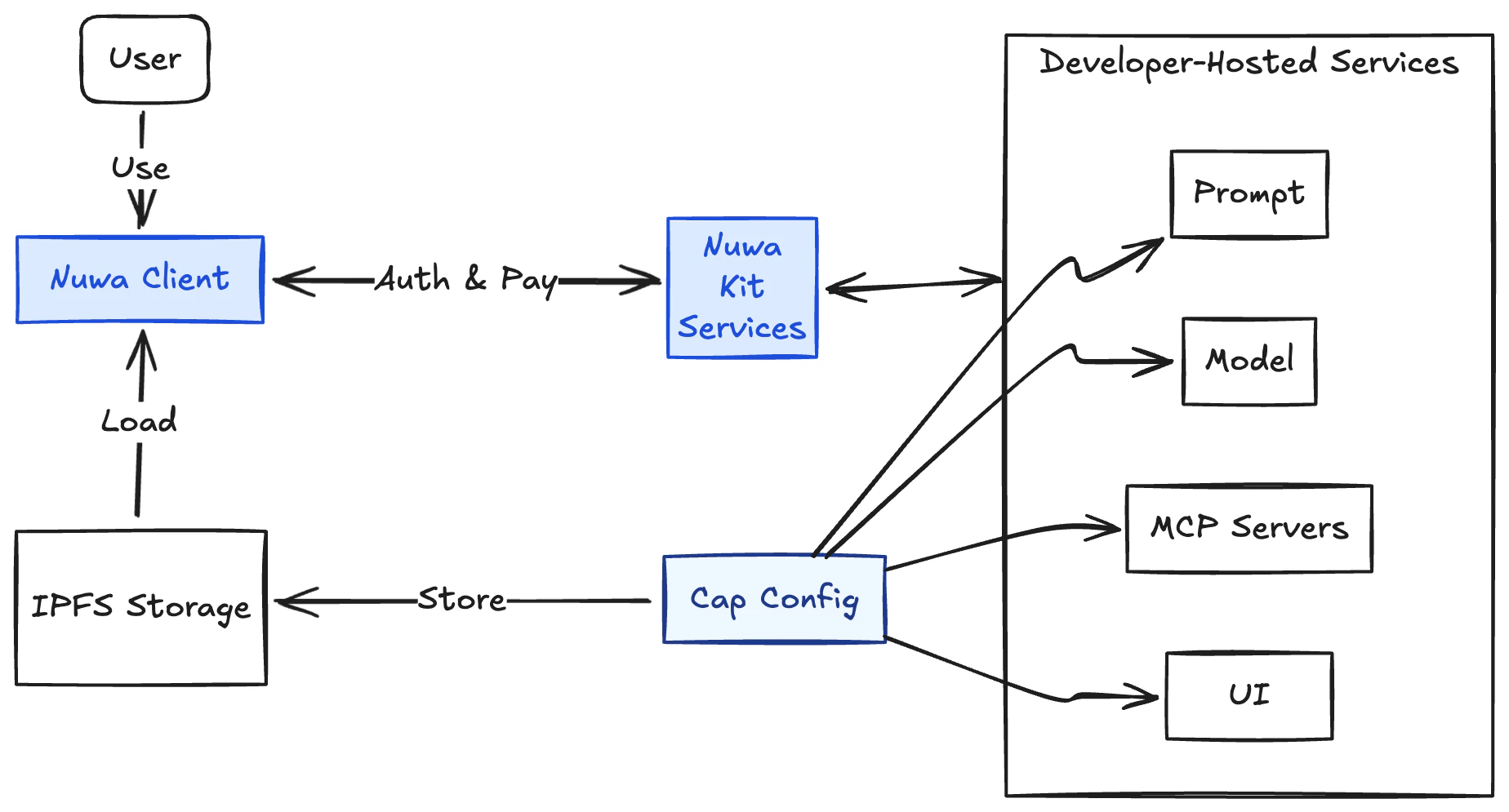
A Cap (capability) is the minimum functional unit in Nuwa. At its core, a Cap is a simple descriptive config file that points to the developer hosted AI services for the Nuwa Client to run. The core of a cap are four pieces:- Prompt: system prompt with optional variables
- Model: the model/provider configuration the Cap runs with
- MCP servers: optional Model Context Protocol tools the Cap can call
- Artifact: optional URL to a UI (iframe) that renders rich experiences
Cap Shape
Integrate Nuwa Kit
In order for your AI services to be compatible and accessible to the Nuwa Client for calling and accepting payments, you need to wrap them with a middleware or a proxy to provide additional headers and data, as well as handling payment and authentication requests sent by the Nuwa Client. For this purpose, we have built the Nuwa Kit sdk to provide some helper functions. See the Development and SDK section for how to start building.Launch Cap
Publish a Cap to IPFS and make it indexable by Nuwa Client
Nuwa Kit
Nuwa Kit SDKs for wrapping your AI services with Identity and Payment.