> ## Documentation Index
> Fetch the complete documentation index at: https://docs.nuwa.dev/llms.txt
> Use this file to discover all available pages before exploring further.
# Revenue
> View balances, withdraw funds, and audit revenue history for your services
## Overview
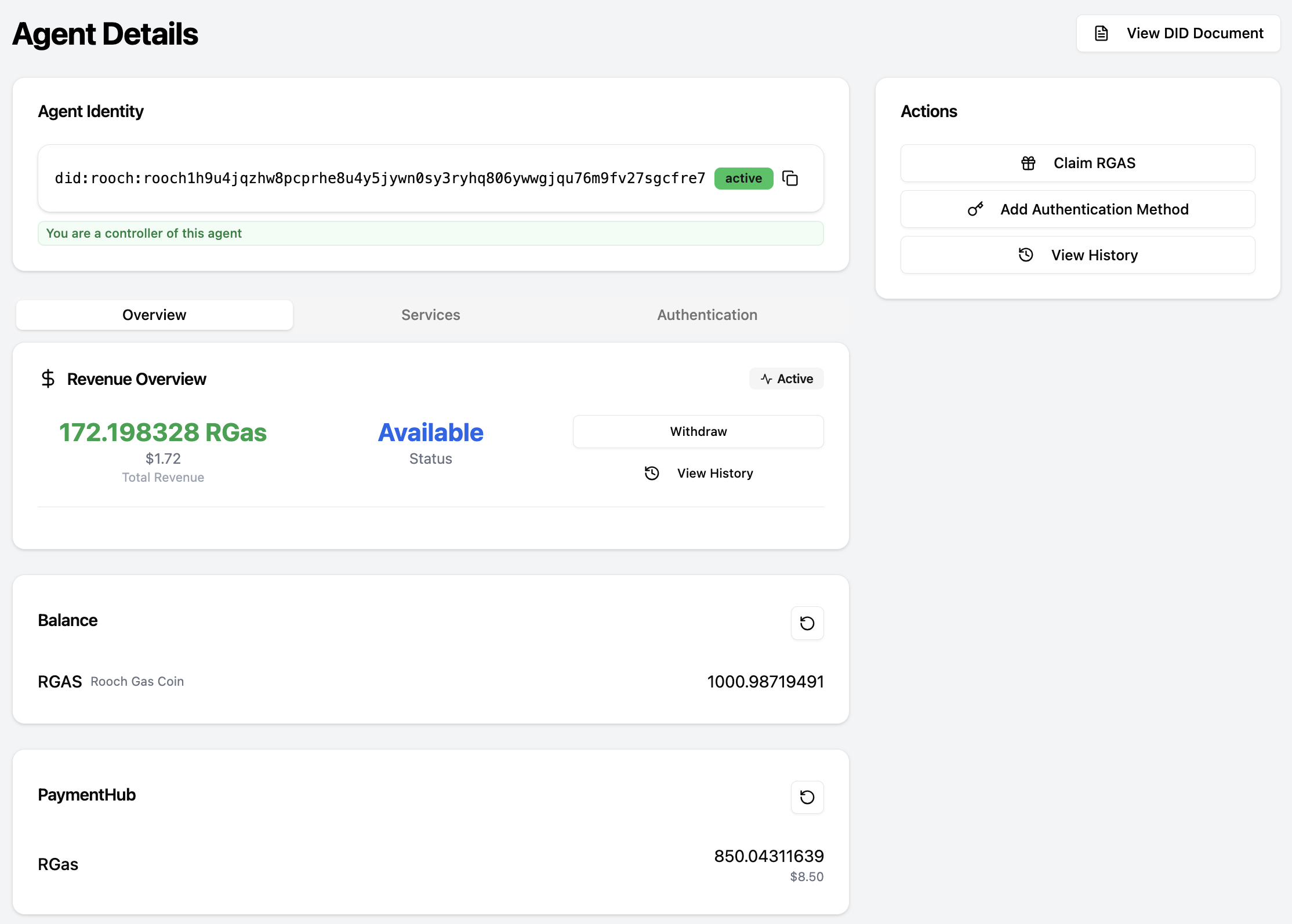
Revenue comes from paid Nuwa service calls (e.g., MCP tools, LLM Gateway requests). When a service's payment channel reaches the configured threshold, it automatically claims into the Agent's Revenue Hub.
Permissions:
* Anyone can view revenue information.
* Withdraw operations require controller permission of the Agent DID.
## Prerequisites
* Completed the Service Key setup.
* Service added to the Agent DID and healthy.
* Client calls to your service have been made (MCP client, LLM Gateway client, or other Nuwa-compatible client).
## Quick Start
1. Open Dashboard → select your Agent → open the Revenue card.
2. Check balances and USD estimation; click "View History" for events.
3. If you are a controller, click "Withdraw", choose asset and amount, preview fees, and confirm.
 ## Concepts & Metrics
* Revenue Hub: balances are tracked per `assetId`.
* USD Estimation: derived from picoUSD price provider (may be cached; considered indicative).
* Events: `RevenueDepositedEvent`, `RevenueWithdrawnEvent`, `RevenueHubCreatedEvent` (displayed as Deposited/Withdrawn/HubCreated in UI).
* Auto-claim: the service claims to the hub once a channel reaches the threshold.
## Workflows
* Generate revenue: client calls → pricing applies → channel reaches threshold → auto-claim → balance increases.
* Withdraw: controller opens modal → preview → submit → wait for confirmation → balance updates.
## Troubleshooting
* No revenue: no calls, missing pricing, threshold not reached, service offline, invalid Service Key.
* Withdraw fails: insufficient balance/fees, not controller.
## Related
Obtain and configure SERVICE\_KEY for your service DID
Calculate the Pricing for your services
Proxy existing MCP servers with payment
Build a paid MCP server directly
## Concepts & Metrics
* Revenue Hub: balances are tracked per `assetId`.
* USD Estimation: derived from picoUSD price provider (may be cached; considered indicative).
* Events: `RevenueDepositedEvent`, `RevenueWithdrawnEvent`, `RevenueHubCreatedEvent` (displayed as Deposited/Withdrawn/HubCreated in UI).
* Auto-claim: the service claims to the hub once a channel reaches the threshold.
## Workflows
* Generate revenue: client calls → pricing applies → channel reaches threshold → auto-claim → balance increases.
* Withdraw: controller opens modal → preview → submit → wait for confirmation → balance updates.
## Troubleshooting
* No revenue: no calls, missing pricing, threshold not reached, service offline, invalid Service Key.
* Withdraw fails: insufficient balance/fees, not controller.
## Related
Obtain and configure SERVICE\_KEY for your service DID
Calculate the Pricing for your services
Proxy existing MCP servers with payment
Build a paid MCP server directly