> ## Documentation Index
> Fetch the complete documentation index at: https://docs.nuwa.dev/llms.txt
> Use this file to discover all available pages before exploring further.
# MCP Server
> Build a Nuwa-Compatible pay‑per‑call MCP server
You can create a Nuwa-Compatible MCP server by using the Nuwa Payment Kit and Identityt Kit.
* **Nuwa Identity Kit** helps to manage your DID key and signs transactions on your MCP server.
* **Nuwa Payment Kit** provides a drop-in replacement version of the FastMCP server wrapper (`createFastMcpServerFromEnv`) that lets you config paid MCP tools easily.
With these SDKs, you can expose a single `/mcp` endpoint and declare free and paid tools in the same way you build your MCP.
## Quick start
Before you start: you need a Service Key for your service DID. Follow the
Service Key guide to create one on cadop-web and copy it
as SERVICE\_KEY.
You can find a starter template in the [Nuwa Kit Examples](https://github.com/nuwa-protocol/nuwa-kit/tree/main/typescript/examples/mcp-server).
```bash theme={null}
pnpm add @nuwa-ai/payment-kit @nuwa-ai/identity-kit
```
```typescript mcp/index.ts theme={null}
import { IdentityKit, KeyManager } from '@nuwa-ai/identity-kit';
import { createFastMcpServerFromEnv } from '@nuwa-ai/payment-kit/mcp';
import { z } from 'zod';
async function main() {
const serviceKey = process.env.SERVICE_KEY || '';
if (!serviceKey) throw new Error('SERVICE_KEY is required');
const keyManager = await KeyManager.fromSerializedKey(serviceKey);
const serviceDid = await keyManager.getDid();
const env = await IdentityKit.bootstrap({
method: 'rooch',
keyStore: keyManager.getStore(),
vdrOptions: { network: 'test' },
});
const server = await createFastMcpServerFromEnv(env, {
serviceId: 'nuwa-mcp-demo',
adminDid: serviceDid,
debug: true,
port: Number(process.env.PORT || 8080),
endpoint: '/mcp',
});
// Paid tool
server.paidTool({
name: 'analyze',
description: 'Analyze input',
pricePicoUSD: 1_000_000_000n, // 0.001 USD
parameters: { text: z.string().describe('Text to analyze') },
async execute({ text }) { return { summary: `Analysis of: ${text}` }; },
});
// Free tool
server.freeTool({
name: 'ping',
description: 'Health check',
parameters: z.object({}),
async execute() { return { ok: true }; },
});
await server.start();
}
main().catch(err => { console.error(err); process.exit(1); });
```
```bash theme={null}
export SERVICE_KEY=... # ServiceDID private key (serialized)
export PORT=8080 # optional
node server.js # or tsx src/index.ts in your project
```
The SERVICE\_KEY value is generated in the
Service Key guide when you add an authentication method to
your Agent DID.
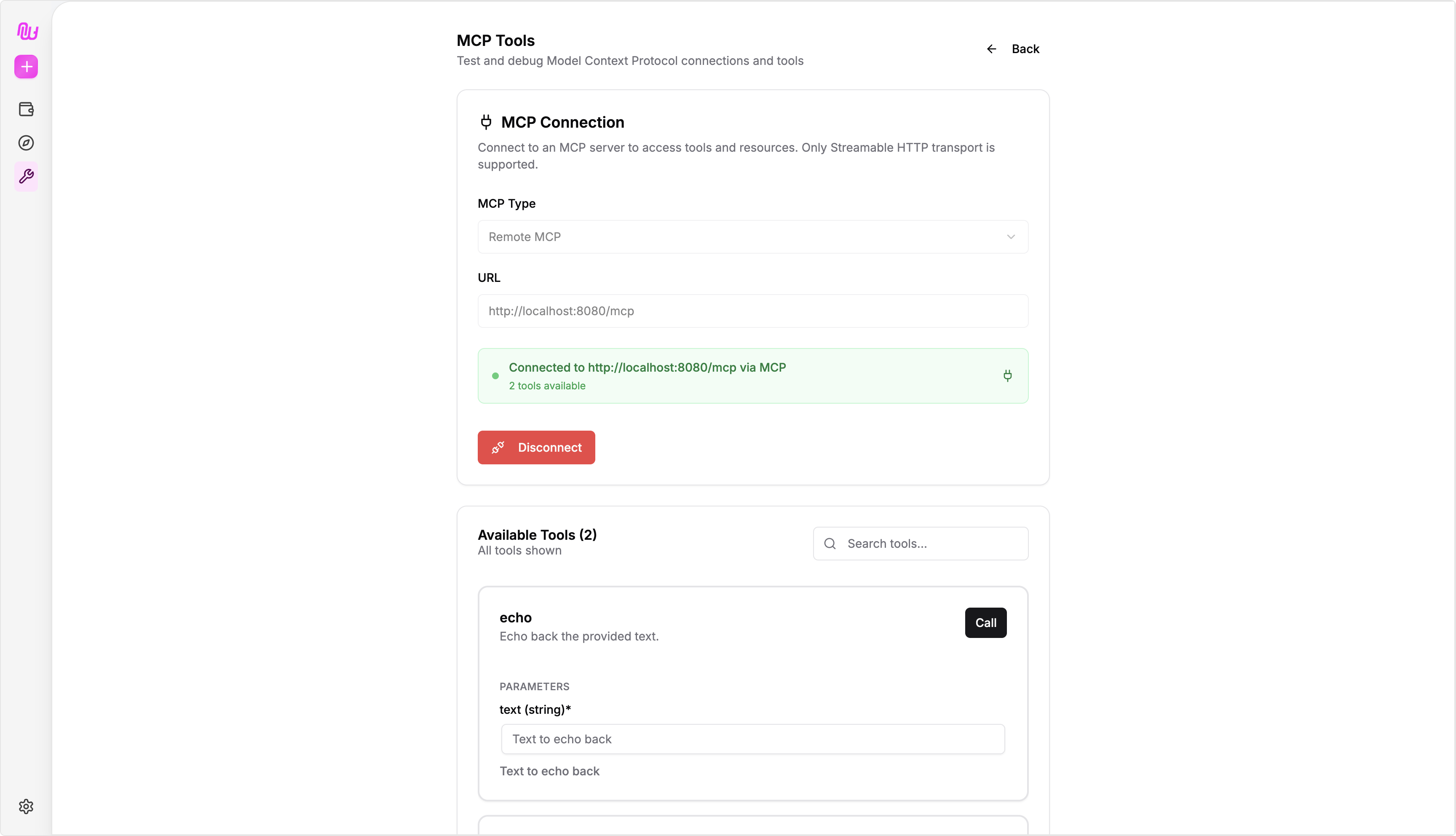
Go to [Nuwa Cap Studio](https://test-app.nuwa.dev/cap-studio) and use the MCP tools to try your MCP server.
 ## `createFastMcpServerFromEnv`
`createFastMcpServerFromEnv` is a drop-in replacement for the FastMCP server wrapper (`createFastMcpServer`). It injects extra fields in the input and output to make the it Nuwa-Compatible and payment possible:
* The wrapper injects `__nuwa_auth` and `__nuwa_payment` into the input.
* For output, it adds a payment resource to the returned object.
For more details, refer to the [Nuwa Payment Kit](https://github.com/nuwa-protocol/nuwa-kit/tree/main/typescript/packages/payment-kit).
### Tool Caller DID
You can obtain the DID of the MCP tool caller via the context input:
```typescript theme={null}
server.freeTool({
name: 'get_did',
description: 'Get the DID of the caller.',
parameters: {},
async execute(_args: unknown, context: any) {
const did = context?.didInfo?.did || "unknown";
return { did };
},
});
```
## Relevant Docs
View balances, withdraw, and audit revenue history
How to obtain and configure SERVICE\_KEY
## `createFastMcpServerFromEnv`
`createFastMcpServerFromEnv` is a drop-in replacement for the FastMCP server wrapper (`createFastMcpServer`). It injects extra fields in the input and output to make the it Nuwa-Compatible and payment possible:
* The wrapper injects `__nuwa_auth` and `__nuwa_payment` into the input.
* For output, it adds a payment resource to the returned object.
For more details, refer to the [Nuwa Payment Kit](https://github.com/nuwa-protocol/nuwa-kit/tree/main/typescript/packages/payment-kit).
### Tool Caller DID
You can obtain the DID of the MCP tool caller via the context input:
```typescript theme={null}
server.freeTool({
name: 'get_did',
description: 'Get the DID of the caller.',
parameters: {},
async execute(_args: unknown, context: any) {
const did = context?.didInfo?.did || "unknown";
return { did };
},
});
```
## Relevant Docs
View balances, withdraw, and audit revenue history
How to obtain and configure SERVICE\_KEY